|
StateCode
|
The state code in the address of the customer making the payment.
    Format: 2-letter code (TX, FL, etc.)
  </td><td>
    * Required for ACH transactions, otherwise optional.
  </td></tr><tr><td>
    PostalCode
  </td><td>
    The postal/zip code in the address of the customer making the payment.
  </td><td>
    Optional
  </td></tr><tr><td>
    CountryCode
  </td><td>
    The country code in the address of the customer making the payment.

    Example: United States = US
  </td><td>
    Optional
  </td></tr><tr><td>
    Email
  </td><td>
    The email address of the customer making the payment.

    Format: [xxx@xxx.xxx](mailto:xxx@xxx.xxx)
  </td><td>
    Required
  </td></tr><tr><td>
    MobilePhone
  </td><td>
    The mobile phone number (10-digits max, no formatting) of the customer making the payment. If Everyware messaging and invoicing are not being used, a unique 10-digit number that is not a phone number may be used. Speak with your Everyware representative for more information.

    Example: 3055551212
  </td><td>
    Required
  </td></tr><tr><td>
    CCNumber
  </td><td>
    The credit card number of the customer making the payment. No spaces should be included in the parameter.
  </td><td>
    💳 REQUIRED FOR CREDIT CARD METHOD
  </td></tr><tr><td>
    ExpirationMonth
  </td><td>
    The month in which the paying customer's credit card will expire. Months 1-9 require a preceding 0.

    Examples: "05", "11"
  </td><td>
    💳 REQUIRED FOR CREDIT CARD METHOD
  </td></tr><tr><td>
    ExpirationYear
  </td><td>
    The year in which the paying customer's credit card will expire. Must be provided in 2-digit format.

    Example: 2016 = "16"
  </td><td>
    💳 REQUIRED FOR CREDIT CARD METHOD
  </td></tr><tr><td>
    CVV
  </td><td>
    The verification code on the paying customer's credit card.

    For Visa or Master Card, this is a 3-digit number. For American Express, this is a 4-digit number.
  </td><td>
    💳 REQUIRED FOR CREDIT CARD METHOD
  </td></tr><tr><td>
    CardType
  </td><td>
    The brand of the card.
  </td><td>
    Optional
  </td></tr><tr><td>
    CardToken
  </td><td>
    The token for the card to be charged, as returned from the Create Payment API.
  </td><td>
    Optional
  </td></tr><tr><td>
    ACHToken
  </td><td>
    The token generated from the individual's banking information.
  </td><td>
    Optional
  </td></tr><tr><td>
    AccountName
  </td><td>
    The name associated with the bank account.
  </td><td>
    Optional
  </td></tr><tr><td>
    AccountNumber
  </td><td>
    The bank account number of the customer. Used for ACH transactions. When testing in the sandbox, any account number between four and eleven digits may be used.
  </td><td>
    🏦 REQUIRED FOR ACH METHOD
  </td></tr><tr><td>
    RoutingNumber
  </td><td>
    The bank routing number for the customer's bank account. Used for ACH transactions. When testing in the sandbox, any valid US routing number may be used.
  </td><td>
    🏦 REQUIRED FOR ACH METHOD
  </td></tr><tr><td>
    AccountType
  </td><td>
    The type of bank account.
  </td><td>
    Optional
  </td></tr><tr><td>
    PaymentType
  </td><td>
    Default value set to "CreditCard". If doing ACH transactions, set value to "ACH".
  </td><td>
    Optional
  </td></tr><tr><td>
    Amount
  </td><td>
    The amount that is to be paid by the customer.

    Example: 1.00
  </td><td>
    Required
  </td></tr><tr><td>
    Description
  </td><td>
    A description of the processed order.
  </td><td>
    Optional
  </td></tr><tr><td>
    OrderNumber
  </td><td>
    This should be a unique value your application defines which is associated with the invoice that appears on the top of the customer facing invoice as "Invoice #" and throughout the Everyware portal.
  </td><td>
    Optional
  </td></tr><tr><td>
    ChargeType
  </td><td>
    Charge – Charge a Credit Card or ACH account in a single transaction.

    For ACH 🏦 - Use Charge

    Authorize – authorize a Credit Card for a specific amount but doesn't charge it right away.

    Default value is Charge. Use this parameter instead of IsAuthOnly unless your Everyware Implementation Specialist indicates otherwise.
  </td><td>
    Optional
  </td></tr><tr><td>
    IsEmailReceipt
  </td><td>
    True/False.

    If true, sends a receipt via automatic email to the email address provided above. Default value set to true.
  </td><td>
    Optional
  </td></tr><tr><td>
    IsSMSReceipt
  </td><td>
    True/False.

    If true, sends a receipt via SMS to the mobile phone number provided above. Default value set to true.
  </td><td>
    Optional
  </td></tr><tr><td>
    CreateToken
  </td><td>
    True/False.

    Set to true to tokenize credit card or ACH account as it is run.

    Set to false if tokenization is not desired.

    Default value set to false.
  </td><td>
    Optional
  </td></tr><tr><td>
    StatementDescriptor
  </td><td>
    In payment receipts and receipt text messages, the statement descriptor is what will show on the customer's bank statement.

    Note: \*Make sure this matches with what will actually show on your customer's bank statement to avoid confusion. Otherwise, set up custom descriptors for your sales site(s) with your Everyware rep.
  </td><td>
    Optional
  </td></tr><tr><td>
    IndividualID
  </td><td>
    The ID associated with the customer making the payment in the Everyware system.
  </td><td>
    Optional
  </td></tr><tr><td>
    ExternalID
  </td><td>
    A unique identifier from an external system associated with the payment that Everyware can store.
  </td><td>
    Optional
  </td></tr><tr><td>
    IsAuthOnly
  </td><td>
    True/False

    Determines whether this is simply authorization and not capture. Used only for specific gateways.

    Default value is set to false.
  </td><td>
    Optional
  </td></tr><tr><td>
    ConvAmount
  </td><td>
    The dollar amount for an optional convenience fee. The settings for this fee can be adjusted in Portal.

    If left blank or at $0.00, it will not appear as a line item.
  </td><td>
    Optional
  </td></tr><tr><td>
    TipAmount
  </td><td>
    The dollar amount that will be left as a tip.
  </td><td>
    Optional
  </td></tr><tr><td>
    TaxAmount
  </td><td>
    The dollar amount for the taxes to be charged. Settings for taxes can be adjusted in Portal.

    If left blank or at $0.00, it will not appear as a line item.
  </td><td>
    Optional
  </td></tr><tr><td>
    SubtotalAmount
  </td><td>
    The total dollar amount for all line items excluding taxes and fees.
  </td><td>
    Optional
  </td></tr><tr><td>
    DiscountAmount
  </td><td>
    The amount that will be discounted from the total charge.
  </td><td>
    Optional
  </td></tr><tr><td>
    DeliveryFee
  </td><td>
    The dollar amount for the optional "Delivery Fee" line item, which can be activated and adjusted in Portal.

    If left blank or at $0.00, it will not appear as a line item.
  </td><td>
    Optional
  </td></tr><tr><td>
    CustomFee1
  </td><td>
    The dollar amount for an optional, custom line item. This fee type can be activated, labeled, and adjusted in the Everyware Portal.

    If left blank or at $0.00, it will not appear as a line item.
  </td><td>
    Optional
  </td></tr><tr><td>
    CustomFee2
  </td><td>
    The dollar amount for an optional, custom line item. This fee type can be activated, labeled, and adjusted in the Everyware Portal.

    If left blank or at $0.00, it will not appear as a line item.
  </td><td>
    Optional
  </td></tr><tr><td>
    CustomerExternalID
  </td><td>
    A unique identifier from an external system associated with the customer making the payment that Everyware can store.
  </td><td>
    Optional
  </td></tr><tr><td>
    InvoiceExternalID
  </td><td>
    A unique identifier from an external system associated with the invoice the customer is paying that Everyware can store.
  </td><td>
    Optional
  </td></tr><tr><td>
    OtherAmount1
  </td><td>
    A field that can store any other amount associated with the payment that is desired.
  </td><td>
    Optional
  </td></tr><tr><td>
    OtherAmount2
  </td><td>
    A field that can store any other amount associated with the payment that is desired.
  </td><td>
    Optional
  </td></tr><tr><td>
    OtherAmount3
  </td><td>
    A field that can store any other amount associated with the payment that is desired.
  </td><td>
    Optional
  </td></tr><tr><td>
    OtherAmount4
  </td><td>
    A field that can store any other amount associated with the payment that is desired.
  </td><td>
    Optional
  </td></tr><tr><td>
    AmountPaymentFee
  </td><td>
    The fee associated with special charges for certain payment methods. If you charge 1.00 to use a card, for example, this is where you would indicate the 1.00.
  </td><td>
    Optional
  </td></tr><tr><td>
    OtherAmount1Name
  </td><td>
    The name for the amount in OtherAmount1.
  </td><td>
    Optional
  </td></tr><tr><td>
    OtherAmount2Name
  </td><td>
    The name for the amount in OtherAmount2.
  </td><td>
    Optional
  </td></tr><tr><td>
    OtherAmount3Name
  </td><td>
    The name for the amount in OtherAmount3.
  </td><td>
    Optional
  </td></tr><tr><td>
    OtherAmount4Name
  </td><td>
    The name for the amount in OtherAmount4.
  </td><td>
    Optional
  </td></tr><tr><td>
    NamePaymentFee
  </td><td>
    The name given to the amount in the AmountPaymentFee parameter.
  </td><td>
    Optional
  </td></tr></tbody></table>
Sample Use Case 1: Create Card Payment
Use a customer's card as the payment method.
{
    "FirstName": "Suzie",
    "LastName": "Sick",
    "Address1": "123 Testing",
    "Address2": "",
    "City": "Austin",
    "StateCode": "TX",
    "PostalCode": "78701",
    "CountryCode": "US",
    "Email": "suziesicktest@everyware.com",
    "MobilePhone":"5125555555",
    "CCNumber": "111111111111111",
    "ExpirationMonth": "11",
    "ExpirationYear": "29",
    "CVV": "111",
    "Amount": "1",
    "Description": "New Patient Enrollment Fee",
    "OrderNumber": "111111",
    "ChargeType": "Charge",
    "IsEmailReceipt": false,
    "IsSMSReceipt": true,
    "StatementDescriptor": "HelloSunshine",
    "CreateToken": true
}
curl --location 'https://rest.everyware.com/api/Default/CreatePayment' \
--header 'Authorization: Basic [xxx]' \
--header 'Content-Type: application/json' \
--data-raw ' {
    "FirstName": "Suzie",
    "LastName": "Sick",
    "Address1": "123 Testing",
    "Address2": "",
    "City": "Austin",
    "StateCode": "TX",
    "PostalCode": "78701",
    "CountryCode": "US",
    "Email": "suziesicktest@everyware.com",
    "MobilePhone":"5125555555",
    "CCNumber": "111111111111111",
    "ExpirationMonth": "11",
    "ExpirationYear": "29",
    "CVV": "111",
    "Amount": "1",
    "Description": "New Patient Enrollment Fee",
    "OrderNumber": "111111",
    "ChargeType": "Charge",
    "IsEmailReceipt": false,
    "IsSMSReceipt": true,
    "StatementDescriptor": "HelloSunshine",
    "CreateToken": true
}
{
    "IsSuccess": true,
    "Message": "The credit card has been accepted.",
    "Data": {
        "TransactionStatus": true,
        "InvoiceNumber": "ew_3JN25fAawEMtODxF3OEtn7Q1",
        "InvoiceID": "ew_3JN25fAawEMtODxF3OEtn7Q1",
        "TokenStatus": true,
        "TokenResult": "card_ew12345678abc"
    },
    "OrderNumber": "111111"
}
Sample Use Case 2: Create Bank Account Payment
Use a customer's bank account as the payment method.
{
    "FirstName": "Suzie",
    "LastName": "Sick",
    "Address1": "123 Suzie St",
    "Address2": "",
    "City": "Boca",
    "StateCode": "FL",
    "PostalCode": "33472",
    "CountryCode": "US",
    "PaymentType": "ACH",
    "Email": "Suzitest@everyware.com",
    "MobilePhone": "5129474078",
    "AccountNumber": "1234536",
    "RoutingNumber": "031176110",
    "Amount": "1",
    "Description": "Name of Item Purchased",
    "ChargeType": "charge",
    "IsEmailReceipt": false,
    "IsSMSReceipt": true,
    "StatementDescriptor": "HelloSunshineMaster",
    "CreateToken": false
}
curl --location 'https://rest.everyware.com/api/Default/CreatePayment' \
--header 'Authorization: Basic [xxx]' \
--header 'Content-Type: application/json' \
--data-raw ' {
    "FirstName": "Suzie",
    "LastName": "Sick",
    "Address1": "123 Suzie St",
    "Address2": "",
    "City": "Boca",
    "StateCode": "FL",
    "PostalCode": "33472",
    "CountryCode": "US",
    "Email": "Suzitest@everyware.com",
    "MobilePhone": "5129474078",
    "AccountNumber": "1234536",
    "RoutingNumber": "031176110",
    "Amount": "1",
    "Description": "Name of Item Purchased",
    "ChargeType": "charge",
    "IsEmailReceipt": false,
    "IsSMSReceipt": true,
    "StatementDescriptor": "HelloSunshineMaster",
    "CreateToken": false
}
{
    "IsSuccess": true,
    "Message": "\r\nThe credit card has been accepted.",
    "Data": {
        "TransactionStatus": true,
        "InvoiceNumber": "EWTest_141150e7-1cae-4236-be7a-6147098614fa",
        "InvoiceID": "EWTest_141150e7-1cae-4236-be7a-6147098614fa",
        "ReceiptNumber": "EWTest_141150e7-1cae-4236-be7a-6147098614fa",
        "TokenStatus": false,
        "TokenResult": null
    },
    "OrderNumber": "E366849224",
    "SMSID": null
}
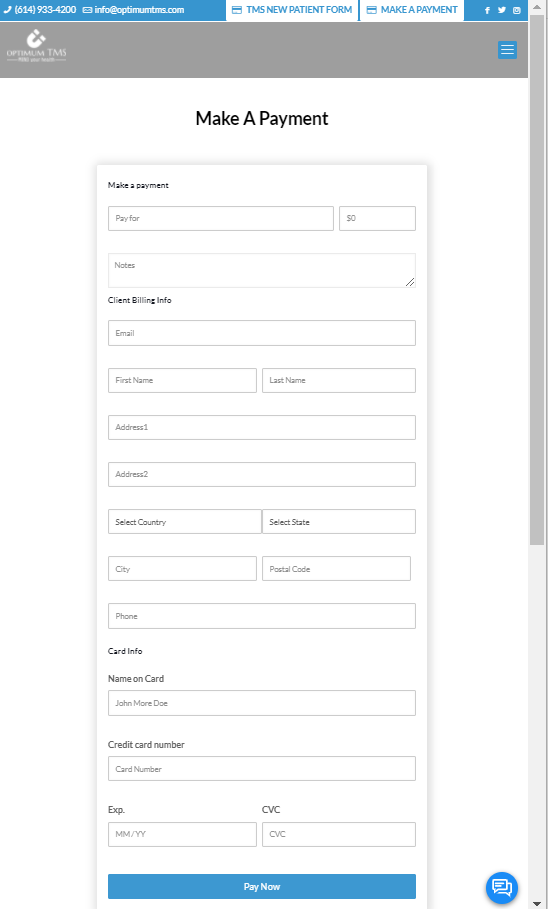
Example Integrated Payment Webform
Integrated payment webform using the CreatePayment API to process online card payments.
|