Hosted Payment Pages
Create unlimited hosted payment pages from the Everyware portal and customize the hosted payment widget to take the standard Open Pay Online button widget to the next level.
See: How to create Hosted Payment Pages in Everyware
Pass customer and billing data from your system to the PCI secure Everyware Hosted Payment Widget to allow customers to view and pay amounts due with security and ease.
| Parameter | Definition | Required or Optional |
|---|---|---|
| FirstName | First Name of paying customer | REQUIRED |
| LastName | Last Name of paying customer | REQUIRED |
| AddressLine1 | First line of customer’s billing street address | REQUIRED |
| AddressLine2 | Second line of customer’s billing street address | OPTIONAL |
| AddressCity | Customer’s billing address city | REQUIRED |
| StateCode | Customer’s billing state code, in two letter format, so “Florida” = “FL” | REQUIRED |
| CountryCode | Customer’s billing zipcode | REQUIRED |
| AddressZip | Customer’s billing country code, in two letter format, so “United States” = “US” (this is default) | REQUIRED |
| EmailAddress | Customer’s email, standard format (xxx@yyy.zzz) | OPTIONAL |
| Phone | Mobile phone number of customer, provided in 10 digit format: 3055551212. | REQUIRED |
| Amount | Total amount to be processed – No “$” required. Example: 1.00 | REQUIRED |
| Description | Line item name. If left blank, will default to '[BusinessName] Payment' | OPTIONAL |
| showbutton | Show or hide the Pay Online button. = True or False | OPTIONAL |
| buttontext | Text on button, defaults to 'Pay Online' | OPTIONAL |
<div id="EWWidget">
<script src="https://portal.everyware.com/.well-known/EWWidget.js">
</script>
<script>
const payInfo = {
FirstName: '',
LastName: '',
AddressLine1: '',
AddressLine2: '',
AddressCity: '',
StateCode: '',
CountryCode: '',
AddressZip: '',
EmailAddress: '',
Phone: '',
Amount: '',
‘Description: '',
G:'KEY'};init
(div ="EWWidget",
 buttontext="Pay Online",
 buttonclass="",
 showbutton = true,
 csshref= "",
 defaultPayInformation = payInfo);
</script>
</div>
Example Hosted Payment Page View
If widget parameters are left blank, customers can key in the amount they wish to pay in the $0.00 amount due field at the top of the page.
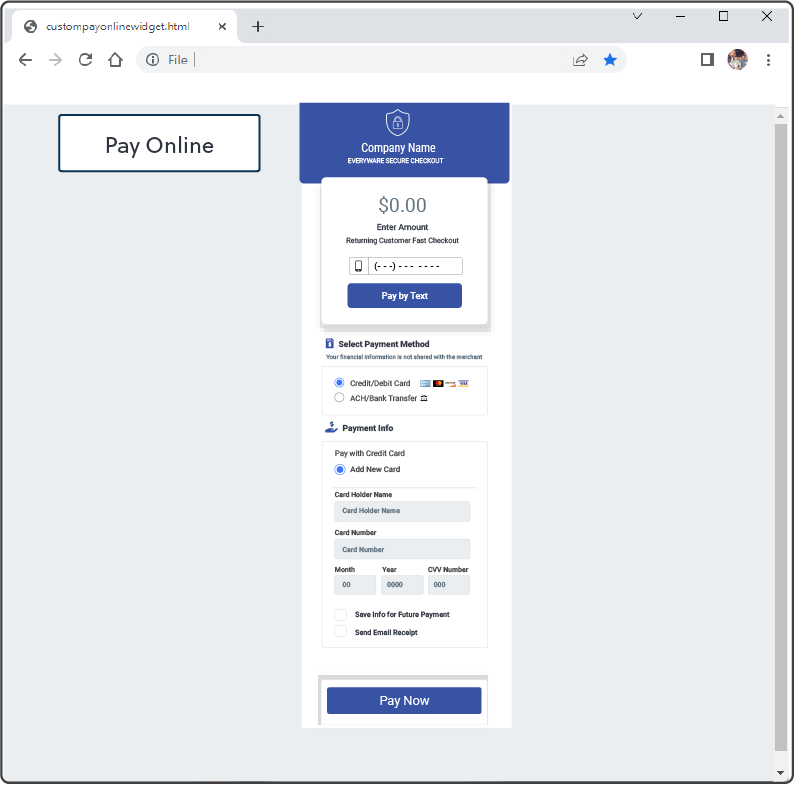
Hosted Pay Page $0.00