Get Terminals
Get Terminals
Use this GET method to fetch synced terminal information.
Sandbox Get URL: https://restsandbox.everyware.com/api/terminals
Live Get URL: https://rest.everyware.com/api/terminals
👍 All or Active Only
You can add /active to the end of the GET URL to retrieve information for only terminals with an Active status if you prefer.
Get Terminals Parameters
| Parameter | Description |
|---|---|
| SalesSiteId | The unique identifier in Everyware for the business. |
| EverywareTerminalId | Everyware issued unique Id used to differentiate between terminals associated with a single Everyware sales site. Ex: “1227001” |
| ProviderTerminalId | Terminal provider issued Id, which appears in the Point of Sale Settings table in the Everyware portal ‘Terminal Id’ column. Ex: “11ecd08f84335ffea994b6a5” |
| ProviderLocationId | Terminal provider issued Id used to differentiate between terminals associated with a single Everyware sales site, which appears in the Everyware Point of Sales Settings table ‘Location Id’ column. Ex: “11eca926e0b93ed2915f8b20” |
| TerminalModel | Terminal provider issued device model name, which appears in the Everyware Point of Sale Settings table ‘Type’ column.Ex: "Ingenico Lane 3000 1591" |
| TerminalName | Originally created using the terminal provider issued device model and make, which you can view in the Everyware Point of Sale Settings table ‘Name’ column and can rename with the table’s Edit action button or UpdateTerminal API. Ex: "Ingenico Lane 3000 1591" |
| IsActive | True: Returns only Active terminals False/Blank: Returns all synced terminals, active or otherwise. Appears in the Everyware Point of Sales Settings table ‘Status’ column and can be toggled to Inactive with the table’s Edit action or with the UpdateTerminal API. |
| CreatedAt | Date the terminal was initially synced to the Everyware system in year-month-day and time format. Appears in the Everyware Point of Sales Settings table ‘Date Added’ column. "2022-05-31T20:11:17.543" |
| UpdatedAt | Date the terminal properties were last updated by Everyware or a portal/API user. Appears in the Everyware Point of Sales Settings table ‘Date Modified’ column."2022-05-31T20:11:17.543" |
Sample Code
[
    {
        "SalesSiteId": 122700,
        "EverywareTerminalId": 7,
        "ProviderTerminalId": "11ecca669ab8bc94bf60000",
        "ProviderLocationId": "11eca926e0b93ed29150000",
        "TerminalModel": "Ingenico Lane 3000 6987",
        "TerminalName": "Ingenico Lane 3000 6987",
        "IsActive": true,
        "CreatedAt": "2022-05-31T20:11:17.55",
        "UpdatedAt": "2022-06-08T20:22:40.343"
    },
      {
        "SalesSiteId": 122700,
        "EverywareTerminalId": 6,
        "ProviderTerminalId": "11ecd08f84335ffea9940000",
        "ProviderLocationId": "11eca926e0b93ed2915f0000",
        "TerminalModel": "Ingenico Lane 3000 1591 - Mel",
        "TerminalName": "Ingenico Lane 3000 1591 - Mel",
        "IsActive": false,
        "CreatedAt": "2022-05-31T20:11:17.543",
        "UpdatedAt": "2022-09-07T15:27:26.533"
    },
    {
        "SalesSiteId": 122700,
        "EverywareTerminalId": 8,
        "ProviderTerminalId": "11ecc6621246339ebf570000",
        "ProviderLocationId": "11eca926e0b93ed2915f0000",
        "TerminalModel": "Mock Terminal 1",
        "TerminalName": "Mock Terminal 1",
        "IsActive": true,
        "CreatedAt": "2022-05-31T20:11:17.55",
        "UpdatedAt": "2022-09-26T17:40:51.757"
    },
    {
        "SalesSiteId": 122700,
        "EverywareTerminalId": 9,
        "ProviderTerminalId": "11ece285efcf88c0a1d70000",
        "ProviderLocationId": "11eca926e0b93ed29150000",
        "TerminalModel": "Ingenico Lane 3000 1",
        "TerminalName": "Ingenico Lane 3000 1",
        "IsActive": true,
        "CreatedAt": "2022-06-02T21:42:34.393",
        "UpdatedAt": "2022-06-08T20:22:44.943"
    },
    {
        "SalesSiteId": 122700,
        "EverywareTerminalId": 16,
        "ProviderTerminalId": "11ed2a2edf2eeb8c93590000",
        "ProviderLocationId": "11eca926e0b93ed2915f0000",
        "TerminalModel": "Ingenico Move 5000",
        "TerminalName": "Ingenico Move 5000",
        "IsActive": true,
        "CreatedAt": "2022-09-07T15:14:23.21",
        "UpdatedAt": "2022-10-07T17:50:36.367"
    }
]
Get Terminals Portal UI
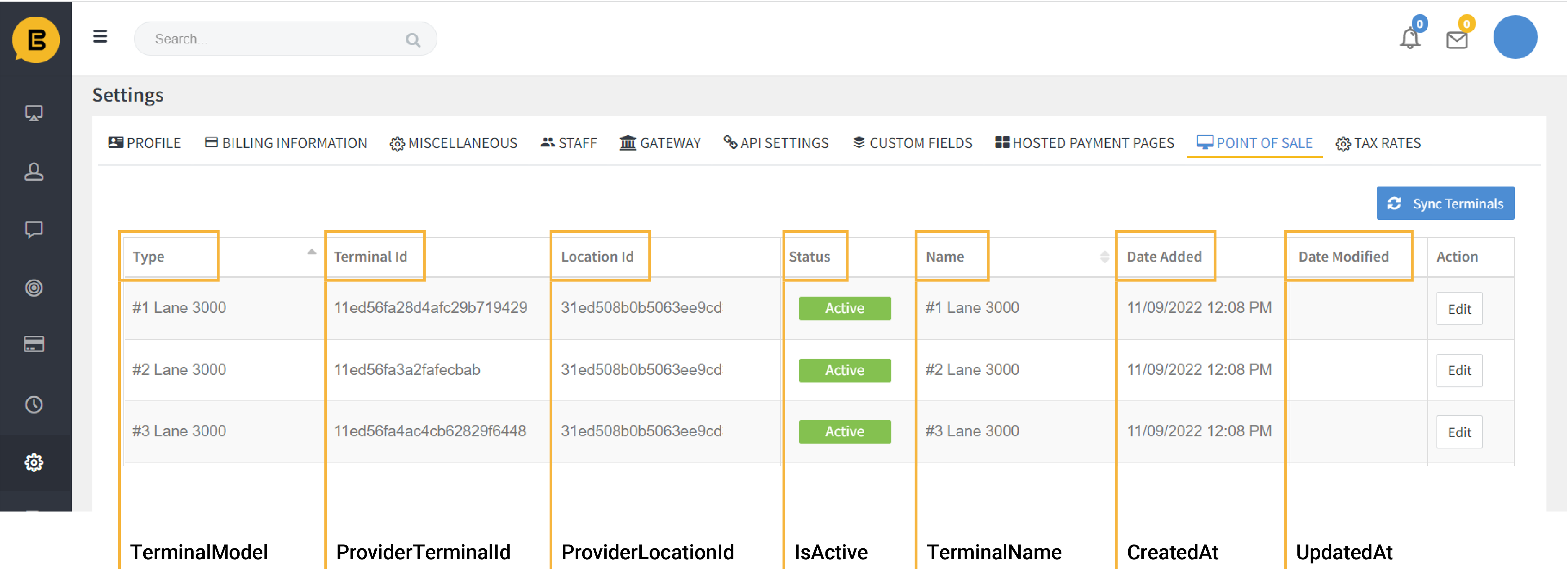
Terminal information as it appears in Point of Sale Settings in Everyware Poral
All Swipe Terminal Integration Guides
🚧 Notice
If your sales site is not enabled for CP Terminal functionality you will encounter an error response, "Card Present Terminal functionality has not be enabled for this sales site" Contact support@everyware.com if you encounter this error.